> For the complete documentation index, see [llms.txt](https://docs.klaykingdoms.com/llms.txt). Markdown versions of documentation pages are available by appending `.md` to page URLs; this page is available as [Markdown](https://docs.klaykingdoms.com/guide/guidebook/item/npc.md).
# NPC 상점
## NPC 상점이란?
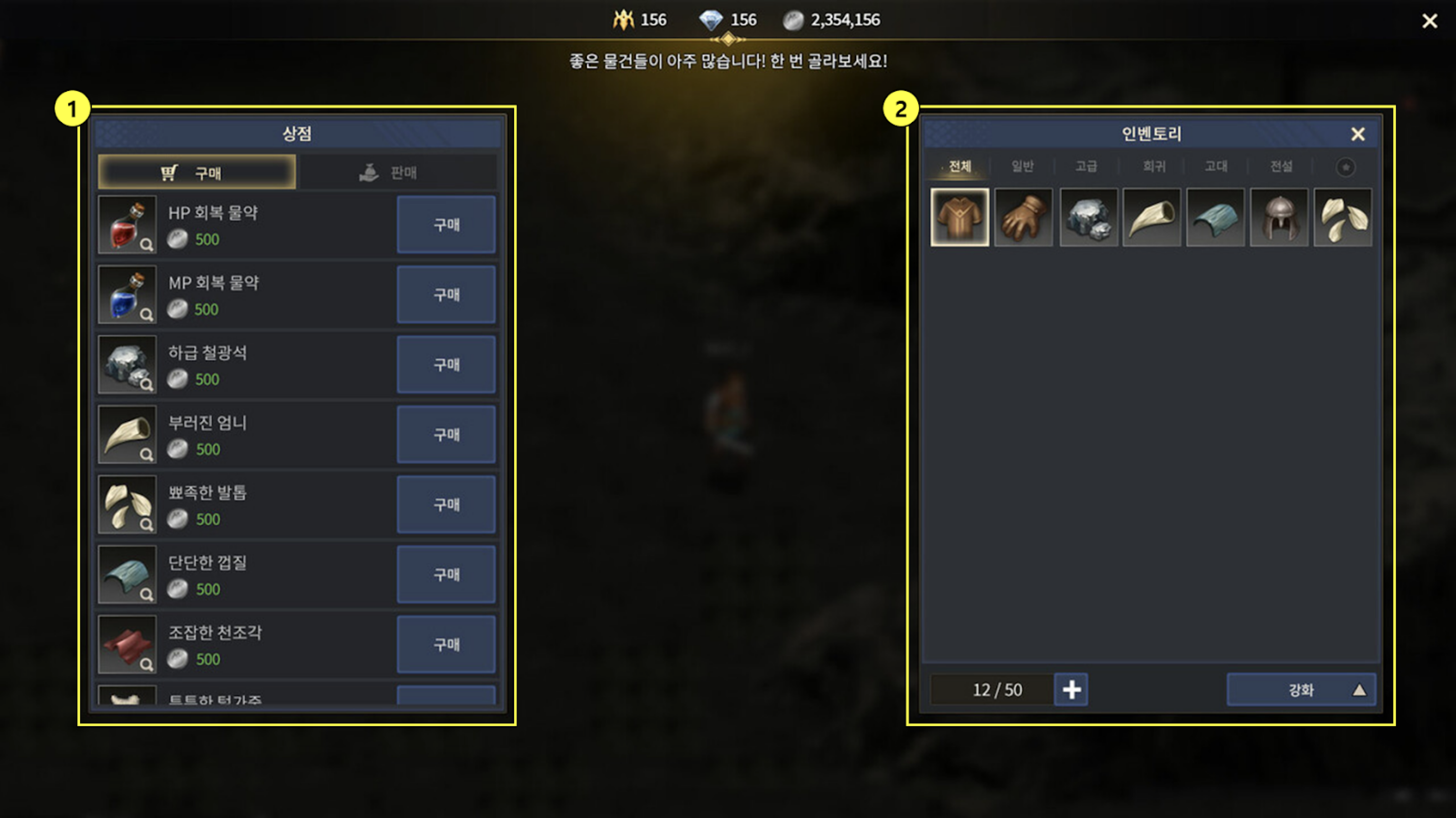
* 모험에 필요한 소모품 등을 상인 NPC를 통해 구매 또는 판매할 수 있습니다.
* 상인 NPC는 하란 대륙 각 지역에 배치되어 있으며 다양한 물품을 보유하고 있습니다.
* 필요한 물품을 재화로 구매해서 보충하거나 필요 없는 물품을 판매해서 재화를 획득할 수 있습니다.
## 상점 구성
* 상인 NPC와 상호작용 시 상점 화면이 표시됩니다.
* NPC가 보유한 물품을 구매하거나 인벤토리에 보유한 물품을 NPC에게 판매할 수 있습니다.
* 현재 판매 가능한 물품만 인벤토리에 표시됩니다.
{% tabs %}
{% tab title="1) NPC 상점" %}
* 상인 NPC와 상호작용 시 표시됩니다.
* 물품을 구매하거나 보유한 물품을 판매할 수 있습니다.
{% endtab %}
{% tab title="2) 인벤토리 보유 물품" %}
* 현재 판매 가능한 보유 물품이 표시됩니다.
{% endtab %}
{% endtabs %}
## 물품 구매
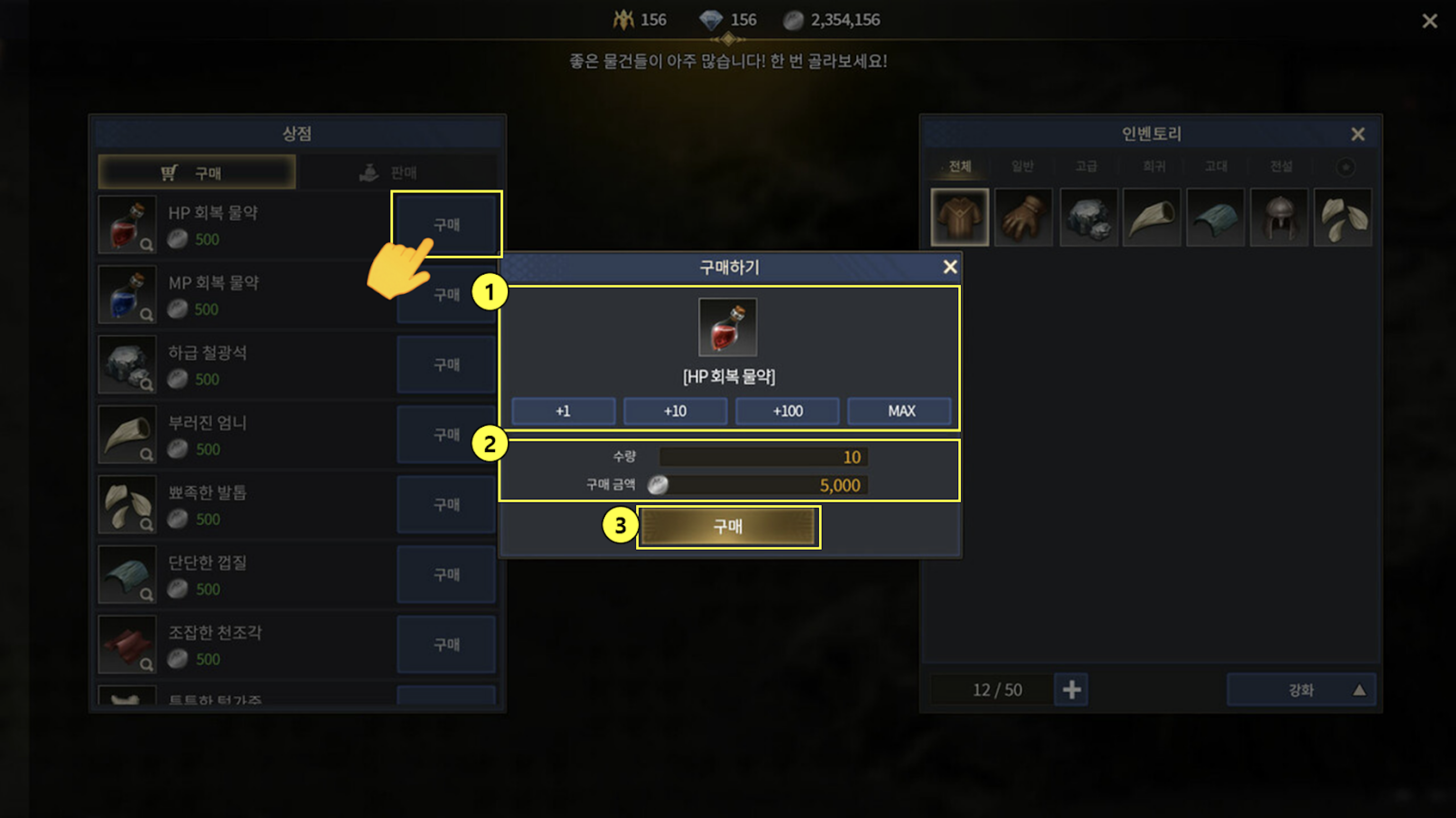
* 원하는 물품의 ‘구매’ 버튼을 선택하면 수량을 설정할 수 있습니다.
* 설정하는 수량에 따라 구매 금액이 변경되며 단일 물품일 경우 수량 추가 버튼이 비활성화 됩니다.
{% tabs %}
{% tab title="1) 구매 품목/수량 설정" %}
* 구매하려는 물품의 아이콘과 이름이 표시됩니다.
* 구매 수량을 설정할 수 있습니다.
{% endtab %}
{% tab title="2) 수량/구매 금액" %}
* 위 설정된 수량의 합이 표시됩니다.
* 수량에 따른 구매 금액의 합이 표시됩니다.
{% endtab %}
{% tab title="3) 구매 결정" %}
* ‘구매’ 버튼 선택 시 구매가 완료됩니다.
* 재화가 부족할 경우 구매가 비활성화 됩니다.
{% endtab %}
{% endtabs %}
## 판매 등록
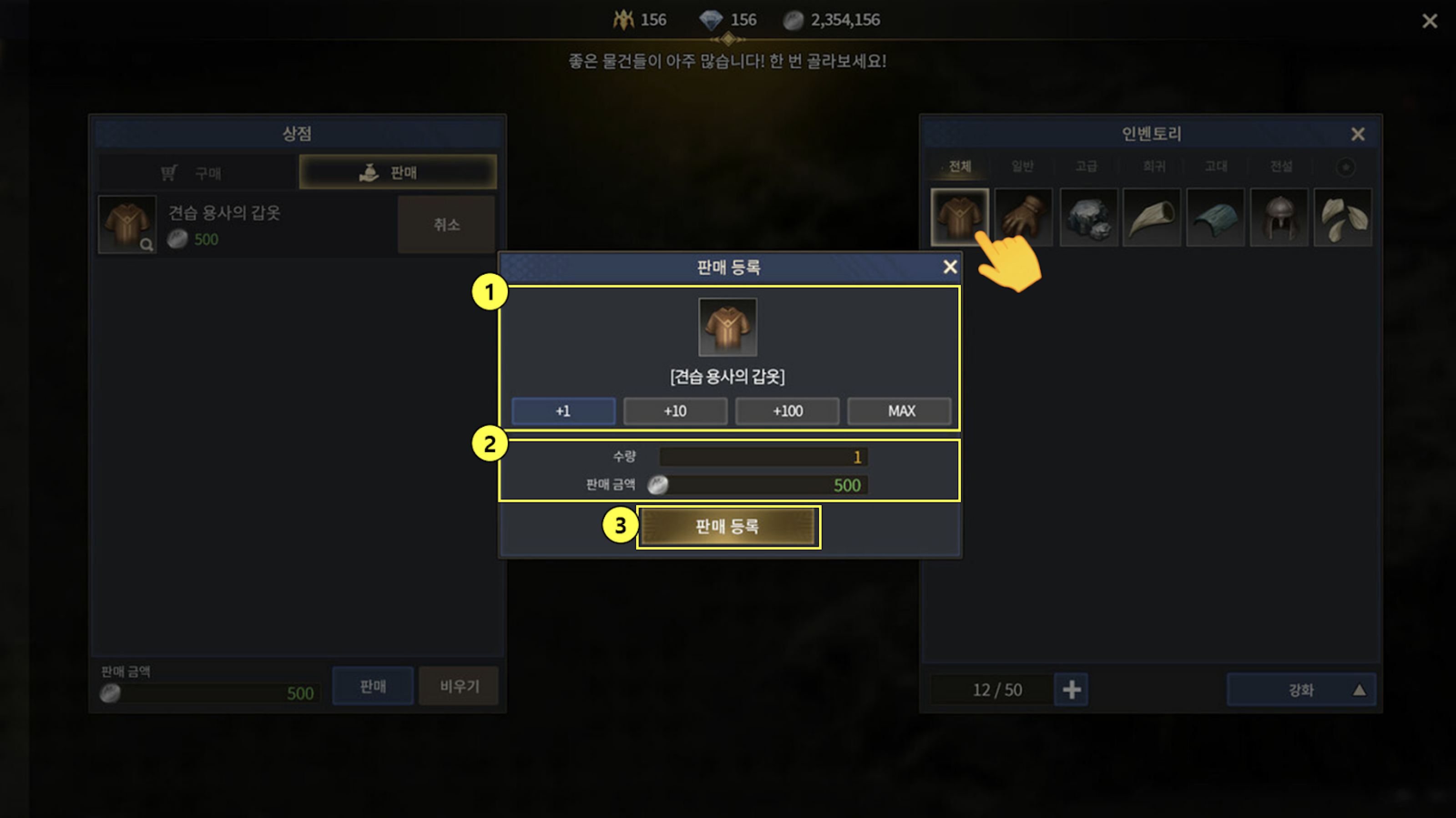
* 인벤토리에 보유한 물품을 NPC에게 정해진 가격에 판매할 수 있습니다.
* 판매할 물품 선택 시 수량을 설정할 수 있습니다.
* 설정하는 수량에 따라 판매 금액이 변경되며 단일 물품일 경우 수량 추가 버튼이 비활성화 됩니다.
{% tabs %}
{% tab title="1) 판매 품목/수량 설정" %}
* 판매하려는 물품의 아이콘과 이름이 표시됩니다.
* 판매 수량을 설정할 수 있습니다.
{% endtab %}
{% tab title="2) 수량/판매 금액" %}
* 위 설정된 수량의 합이 표시됩니다.
* 수량에 따른 판매 금액의 합이 표시됩니다.
{% endtab %}
{% tab title="3) 판매 등록" %}
* ‘판매 등록’ 버튼 선택 시 판매 목록에 추가됩니다.
{% endtab %}
{% endtabs %}
## 물품 판매
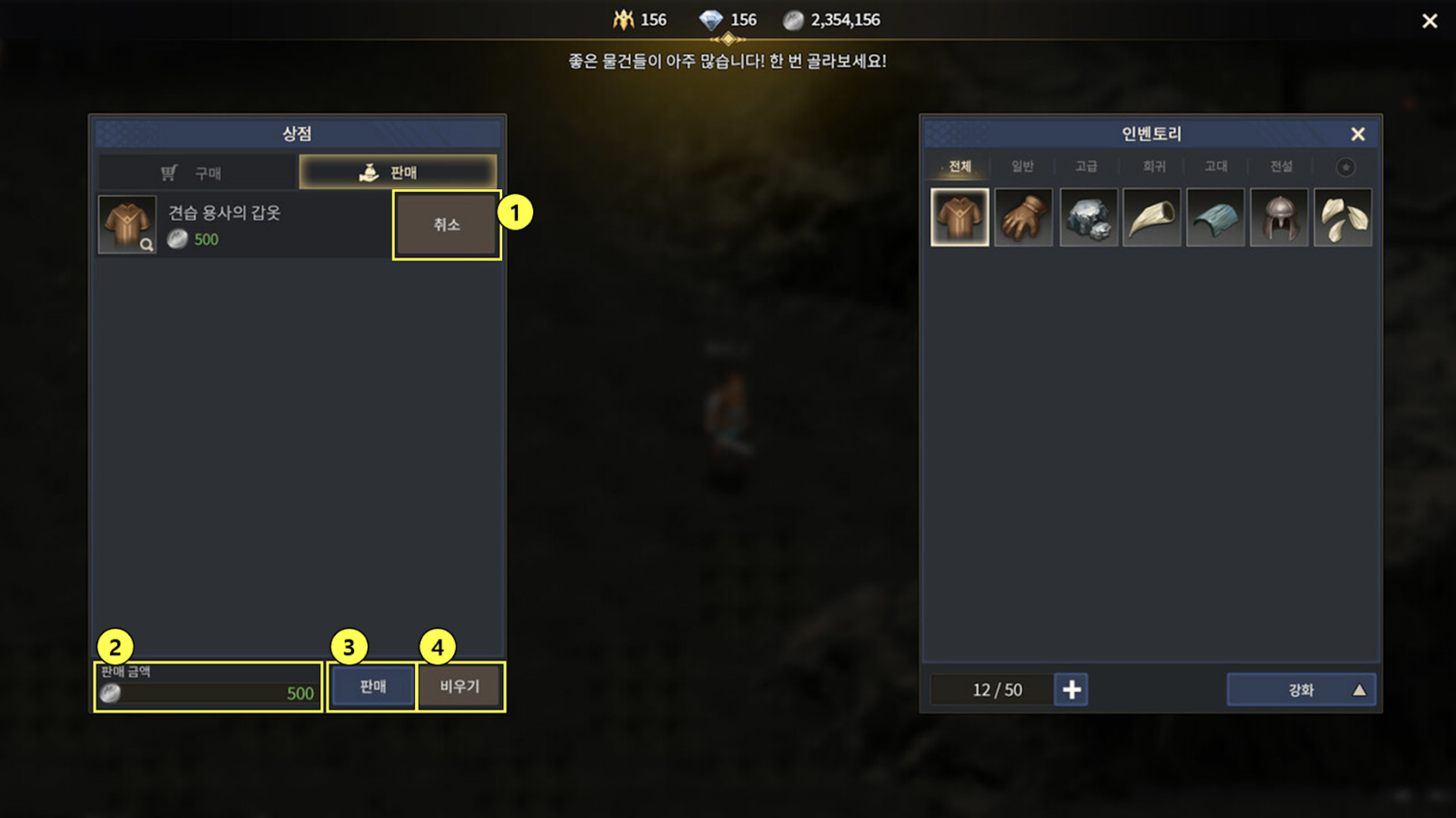
* 수량 설정 후 판매 등록 시 목록에 추가됩니다.
* 등록된 물품은 ‘취소’ 또는 ‘비우기’ 버튼으로 다시 되돌릴 수 있습니다.
* 판매로 획득하는 총 재화는 ‘판매 금액’에 표시됩니다.
* 보유한 물품을 등록하지 않으면 판매가 이루어지지 않습니다.
{% tabs %}
{% tab title="1) 판매 단일 취소" %}
* 현재 등록된 판매 물품 1개가 취소됩니다.
{% endtab %}
{% tab title="2) 판매 금액" %}
* 등록된 물품을 모두 판매하여 획득하는 총 재화가 표시됩니다.
{% endtab %}
{% tab title="3) 판매 결정" %}
* 등록된 물품에 대한 판매를 최종 결정합니다.
{% endtab %}
{% tab title="4) 판매 일괄 취소" %}
* 현재 등록된 판매 물품이 일괄 취소됩니다.
{% endtab %}
{% endtabs %}
{% hint style="warning" %}
#### 이 문서는 2023-04-27에 업데이트 되었습니다. 일부 내용은 게임과 다를 수 있습니다.
{% endhint %}