# Menus & UI

<figure><img src="/files/RAXLNxfZOcXR7nOC3kNR" alt=""><figcaption></figcaption></figure>

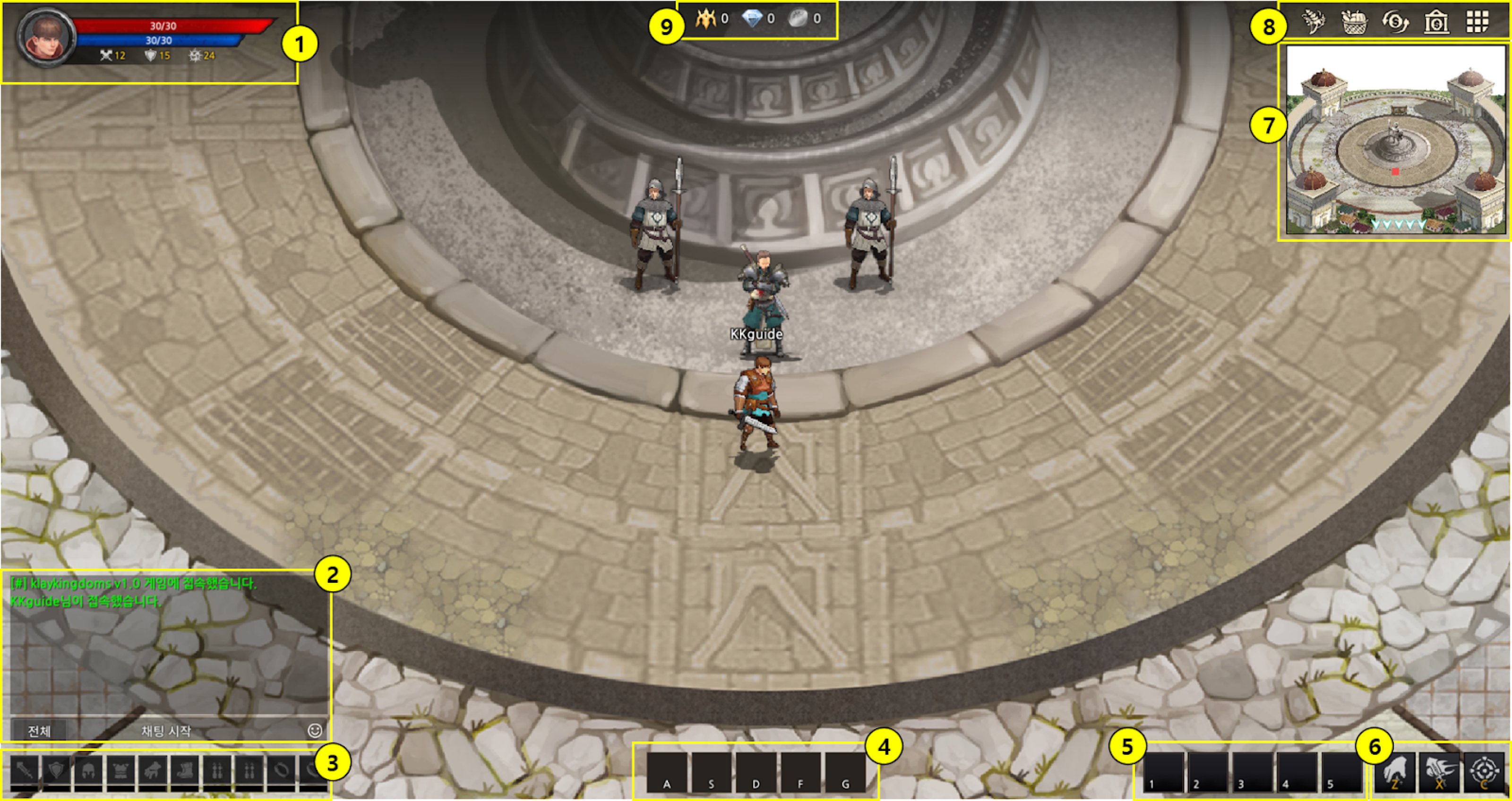
<table><thead><tr><th width="72.33333333333334">No.</th><th width="119">Feature</th><th>Description</th></tr></thead><tbody><tr><td>1</td><td><p>Character </p><p>Information</p></td><td>Character information such as HP, MP, Attack, Defense, and Hit can be found here.</td></tr><tr><td>2</td><td><p>Chat </p><p>Window</p></td><td>Players can communicate via the chat window. Emojis and stickers are also available.</td></tr><tr><td>3</td><td>Item XP/Level</td><td>Experience points and current levels of the equipped items can be found here.</td></tr><tr><td>4</td><td>Skill Quick Slots</td><td>You can add skills to the slots here for quick access. (To be updated later)</td></tr><tr><td>5</td><td>Item Quick Slots</td><td>You can add items to the slots here for quick access. (To be updated later)</td></tr><tr><td>6</td><td>Actions</td><td>Actions that include interaction, default attacks, and targeting are available from here. (To be updated later)</td></tr><tr><td>7</td><td>Mini-Map</td><td>You can check your character's current location and surroundings.</td></tr><tr><td>8</td><td>Game Menus</td><td>The menu includes Farm, Harvest, Swap, and Bank by default. You can see all menus by clicking the All Menus Button.</td></tr><tr><td>9</td><td>Currencies</td><td>You can check your balance of each currency here.</td></tr></tbody></table>

{% hint style="warning" %}
**This document was updated on March 2, 2023. Some elements may differ from the game.**
{% endhint %}


---

# Agent Instructions: Querying This Documentation

If you need additional information that is not directly available in this page, you can query the documentation dynamically by asking a question.

Perform an HTTP GET request on the current page URL with the `ask` query parameter:

```
GET https://docs.klaykingdoms.com/en/guide/gameplay/beginners-guide/menus.md?ask=<question>
```

The question should be specific, self-contained, and written in natural language.
The response will contain a direct answer to the question and relevant excerpts and sources from the documentation.

Use this mechanism when the answer is not explicitly present in the current page, you need clarification or additional context, or you want to retrieve related documentation sections.
